Cover By Nabin Logo
COVER BY NABIN
New Authors Get 3 Free Trial Generations

Free AI Book Cover Creator

Tell us your book details, pick a genre, then describe your vision, our AI handles the rest in seconds.

Step 1 of 3

Book Details

Required
Try an example →

Cover Preview

Ready

Your AI Cover Will Appear Here

Complete the 3 steps on the left, then click “Generate Cover”.

1 Enter your book title & author name
2 Choose your book genre & sub-genre
3 Customize cover elements & click Generate!
Our Free Cover Maker is Magical... Every new author gets 3 free trial credits! Sign in to claim yours.

Past 5 Generations

Auto-deletes in 3 days
Your past 5 generated covers will appear here...
Make It Print-Ready (from $59)

Nabin upscales your cover to 300 DPI and fixes small AI glitches ($59), or builds the full paperback wrap with spine and back cover ($129).

Explore more free tools and services

Simple Pricing

Generation Credit Packages

Choose the package that fits your author journey. Pay once with zero subscriptions.

AI CREDITS

25 Generations

$9 / one-time
  • 25 AI Cover Generations
  • Enough for one book
  • Full Commercial Rights
Buy 25 Credits ($9)
AI CREDITS

50 Generations

$15 / one-time
  • 50 AI Cover Generations
  • Download without watermark
  • Full Commercial Rights
Buy 50 Credits ($15)
AI CREDITS

150 Generations

$29 / one-time
  • 150 AI Cover Generations
  • Download without watermark
  • Full Commercial Rights
Buy 150 Credits ($29)
AI CREDITS

300 Generations

$49 / one-time
  • 300 AI Cover Generations
  • Download without watermark
  • Full Commercial Rights
Buy 300 Credits ($49)
HUMAN POLISH

Make It Print-Ready

  • $59 Ebook front: 300 DPI upscale, glitch fixes
  • +$70 Paperback wrap · +$40 Hardback · +$29 Audiobook
  • Light touch: your AI artwork is used as-is. No credits included.
Human Designer Polish & Formatting

Love Your AI Cover? Make It Print-Ready.

Web AI previews are great for testing concepts. Nabin will personally upscale your cover, fix small AI glitches and, if you are printing, build the full paperback wrap to KDP and IngramSpark specs. These are light-touch services: your AI artwork is used as-is. If the artwork or lettering needs rebuilding by hand, that is AI Cover Rescue, from $149.

1. Manual Review & Glitch Fixes

Nabin manually reviews your generated artwork, fixes small AI glitches such as stray letters or odd hands, and proofreads your title and author name.

2. 300 DPI High-Resolution Upscale

Converts web drafts into ultra-crisp 300 DPI print files with CMYK color profiles, ensuring your physical book cover prints sharp without pixelation.

3. Print Wrap (Spine & Back Cover)

Quick Print Wrap only: spine sized to your page count, a simple back cover with your blurb on a matching background, bleed, and a clear barcode area.

How To Order In 3 Easy Steps:

1 Generate AI draft
2 Pick formats & pay
3 Get Print PDF
Nabin Karna
Note by Nabin

"Send me your AI cover. I'll make it 100% print-ready."

Upscale & Clean-up
$59 / front cover
  • 300 DPI upscale of your front cover
  • Small AI glitch fixes and text proofread
  • Kindle ebook file at 1600 x 2560
  • One revision
Order Ebook Front ($59)
Quick Print Wrap
$129 / full paperback wrap
  • Everything in Upscale & Clean-up
  • Spine sized to your page count
  • Simple back cover with your blurb
  • Barcode area, bleed and print PDF
  • Two revisions
Order Ebook + Paperback ($129)

Add a hardback wrap (+$40) or an audiobook cover (+$29) in the next step. Built to KDP and IngramSpark specs. If your printer rejects the file, Nabin fixes it free. Nothing to upload: Nabin receives your original AI file.

Formats Supported
KDP IngramSpark Draft2Digital Lulu
Book cover ideas without the blank page

An AI Book Cover Generator Built for Authors

Create an original visual direction before publication. The tool combines your book title, author name, genre, design brief, style choices, and optional reference inspiration into a focused cover concept you can download, evaluate at thumbnail size, or develop into a complete print wrap.

Describe your story

Enter the exact title and author text, choose a genre such as fantasy, romance, thriller, horror, historical fiction, science fiction, literary fiction, young adult, or nonfiction, then describe the atmosphere readers should feel.

Generate an original concept

The AI translates your creative brief into a portrait cover idea with integrated typography. Upload one optional reference cover when you want similar mood, composition, or visual energy without asking for an exact copy.

Test, refine, and publish

Download your concept and check whether it reads clearly in Amazon search results with the free thumbnail audit. For paperback or hardcover, use the cover template calculator and order professional 300 DPI wrap preparation.

From instant concept to bookstore-ready design

An AI-generated image is a creative starting point, not automatically a print-ready cover. Amazon KDP, IngramSpark, Lulu, and other printers require exact trim size, bleed, spine width, barcode placement, and high-resolution output. Cover By Nabin can turn the direction you love into a professionally prepared ebook cover or full print wrap.

Real output, not mockups

AI Book Cover Examples by Genre

Each cover below was made with this AI book cover creator from a one or two sentence brief, using sample titles. Nothing was retouched, so you can judge the text rendering and the genre styling for yourself.

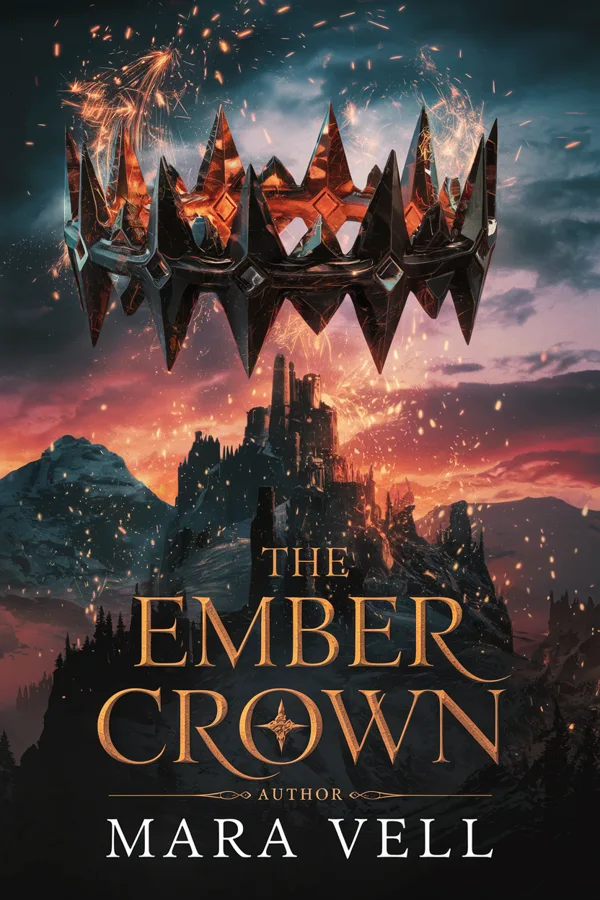
AI book cover example, fantasy: The Ember Crown by Mara Vell, made with the Cover By Nabin AI book cover creator

Fantasy: The Ember Crown

Brief: A floating obsidian crown wreathed in embers above a mountain fortress at dusk.

Honest note: Look closely: the model added a small stray “AUTHOR” label above the name. That is the kind of detail to fix before you publish.

AI book cover example, romance: Summer at Larkspur Bay by Elise Hart, made with the Cover By Nabin AI book cover creator

Romance: Summer at Larkspur Bay

Brief: A couple walking a beach at sunset, pastel sky, lighthouse in the distance, script title.

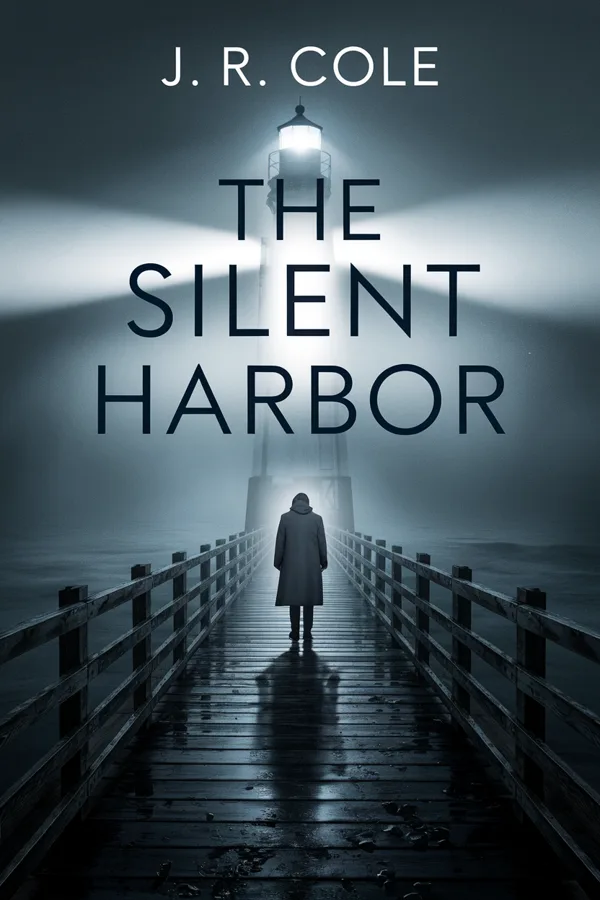
AI book cover example, thriller: The Silent Harbor by J. R. Cole, made with the Cover By Nabin AI book cover creator

Thriller: The Silent Harbor

Brief: A lone figure on a foggy pier at night, a lighthouse beam, cold blue palette, bold condensed title.

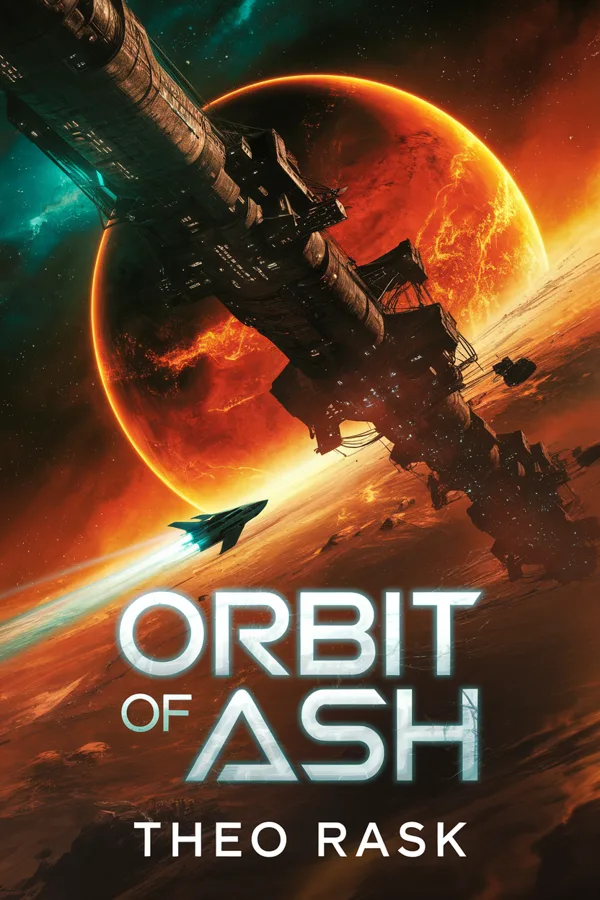
AI book cover example, science fiction: Orbit of Ash by Theo Rask, made with the Cover By Nabin AI book cover creator

Science fiction: Orbit of Ash

Brief: A derelict space station orbiting a burning red planet, orange and teal light.

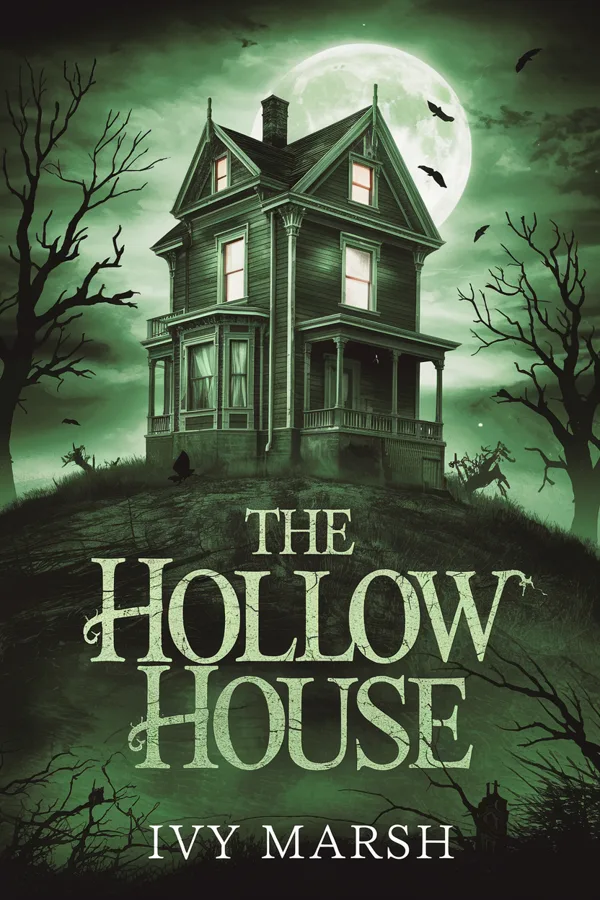
AI book cover example, horror: The Hollow House by Ivy Marsh, made with the Cover By Nabin AI book cover creator

Horror: The Hollow House

Brief: A crooked Victorian house under a pale moon, one lit window, crows, green-black palette.

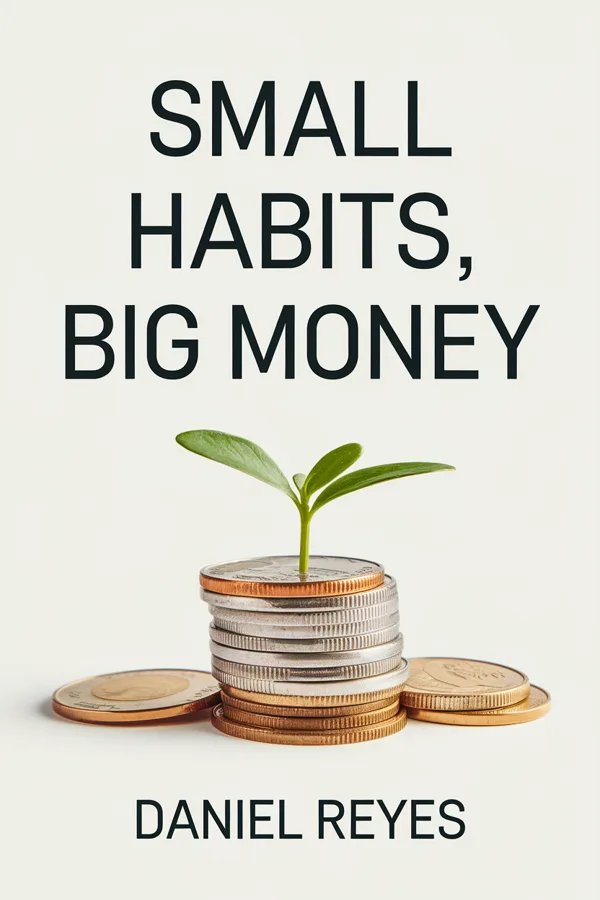
AI book cover example, non-fiction: Small Habits, Big Money by Daniel Reyes, made with the Cover By Nabin AI book cover creator

Non-fiction: Small Habits, Big Money

Brief: A minimal off-white cover with a sprout growing from a stack of coins and a large bold title.

How to Write a Brief the AI Book Cover Maker Understands

The generator follows your brief closely, so a few specific sentences beat a long wish list. The covers above all follow the same pattern:

  1. Name the genre and sub-genre first. “Cozy mystery” and “psychological thriller” produce very different covers, and readers recognise their genre in a fraction of a second.
  2. Describe one focal image. A crown, a house, a lone figure. Covers with a single strong subject still read at thumbnail size in Amazon search results.
  3. Give the mood and two or three colours. “Cold blue-grey, high contrast” or “warm pastel sunset” steers the whole palette.
  4. Say how the title should look. Serif or sans-serif, script or bold condensed capitals, top or middle. Put the exact title and author name in quotation marks.
  5. Leave out what you do not want to fight. Extra characters, tiny props and long taglines give the model more ways to go wrong.

Then shrink the result to postage-stamp size with the free thumbnail test. If the title is unreadable there, it will be unreadable on Amazon too.

Can You Publish an AI Book Cover on Amazon KDP?

Yes. Amazon KDP accepts AI-generated covers, with two conditions written into its content guidelines. First, when you publish you must tell KDP that the book contains AI-generated images, and the cover counts. Second, you remain responsible for the content: no trademarks, no real people’s likenesses and nothing copied from another book. AI-assisted work, where you created the image yourself and only used AI to edit it, does not need to be disclosed.

AI Book Cover Size for Kindle and Paperback

Every concept comes out as a 2:3 portrait image of 832 by 1248 pixels. That clears KDP’s 500 pixel minimum for an ebook, but Amazon recommends 1,600 by 2,560 pixels at a 1.6:1 ratio for the sharpest Kindle cover. A paperback or hardcover needs much more: a 300 DPI full wrap with back cover, a spine sized to your page count, and bleed on every edge. Work out those measurements with the free KDP cover calculator, or let Nabin build it with the Quick Print Wrap above.

AI Generator, Premade Cover or Custom Designer?

All three are sold on this site, so here is the honest comparison:

OptionPriceBest forTrade-off
AI book cover creator3 free, then from $9 for 25Exploring ideas fast, ebooks, briefing a designerYou proofread and fix small AI glitches
Upscale & Clean-up$59An AI cover you love, for ebook or a print-quality frontLight touch: artwork used as-is
Quick Print Wrap$129The same, plus spine and a simple back cover for paperbackLight touch: artwork used as-is
AI Cover RescueFrom $149An AI cover with real problems: artwork or lettering rebuilt by handMore work, so it costs more
Premade cover$49A finished, designer-made cover on a budgetChoose from existing designs
Custom cover designFrom $149Series branding and a fully original conceptTakes days, not seconds

Frequently Asked Questions

Everything you need to know about instant AI book covers.

How does the AI Book Cover Generator work?

Enter your title and author, choose a genre, then describe your visual concept. The generator turns those details into an original cover concept. You can also upload one optional reference cover for visual inspiration.

Do I own full commercial rights to my generated cover?

Yes. Cover concepts generated using your credits include full commercial usage rights, subject to our terms. You remain responsible for reviewing the final artwork, typography, trademarks, and suitability before publication.

Why do I need manual upscaling for paperback printing?

The instant cover is a web-resolution concept. Paperback and hardcover printers such as KDP, IngramSpark and Lulu require a 300 DPI full wrap with exact trim, bleed and spine measurements, so a separate print-ready formatting step is needed.

If you would rather not do that step yourself, the AI cover rescue service rebuilds the generated artwork by hand and returns a print-ready file.

Is the AI book cover generator free?

Every new account gets three free generations, with no card required. After that, covers cost credits: 25 for $9, 50 for $15, 150 for $29 or 300 for $49, and one credit makes one cover. A failed generation is refunded automatically.

Can the AI put my title and author name on the cover correctly?

Usually, yes. The generator uses an image model chosen for accurate cover typography, and it prints the exact title and author text you enter. Short titles render most reliably. Always proofread the result letter by letter before you publish, because an AI model can still add or drop a character.

Can I use an AI-generated book cover on Amazon KDP?

Yes. Amazon KDP accepts AI-generated covers, but its content guidelines require you to disclose AI-generated text, images or translations when you publish, and that includes the cover. You must also make sure the cover does not copy a trademark, a real person or another book's artwork.

What size is the AI cover, and does it fit Kindle?

Each concept is a 2:3 portrait image of 832 by 1248 pixels, which is above KDP's 500 pixel minimum and works as a Kindle concept. Amazon recommends 1,600 by 2,560 pixels (a 1.6:1 ratio) for the best ebook quality, and paperbacks need a 300 DPI full wrap with spine and bleed, so plan a resize or the print-ready add-on before launch.

What is the difference between Quick Print Wrap and AI Cover Rescue?

Upscale & Clean-up ($59) and Quick Print Wrap ($129) are light-touch services: your AI artwork is kept as it is, upscaled to 300 DPI, lightly cleaned up and, for the wrap, given a spine and a simple back cover. AI Cover Rescue (from $149) is for covers with real problems: the artwork is repaired by hand, the title is reset in licensed type and the back cover is fully designed.