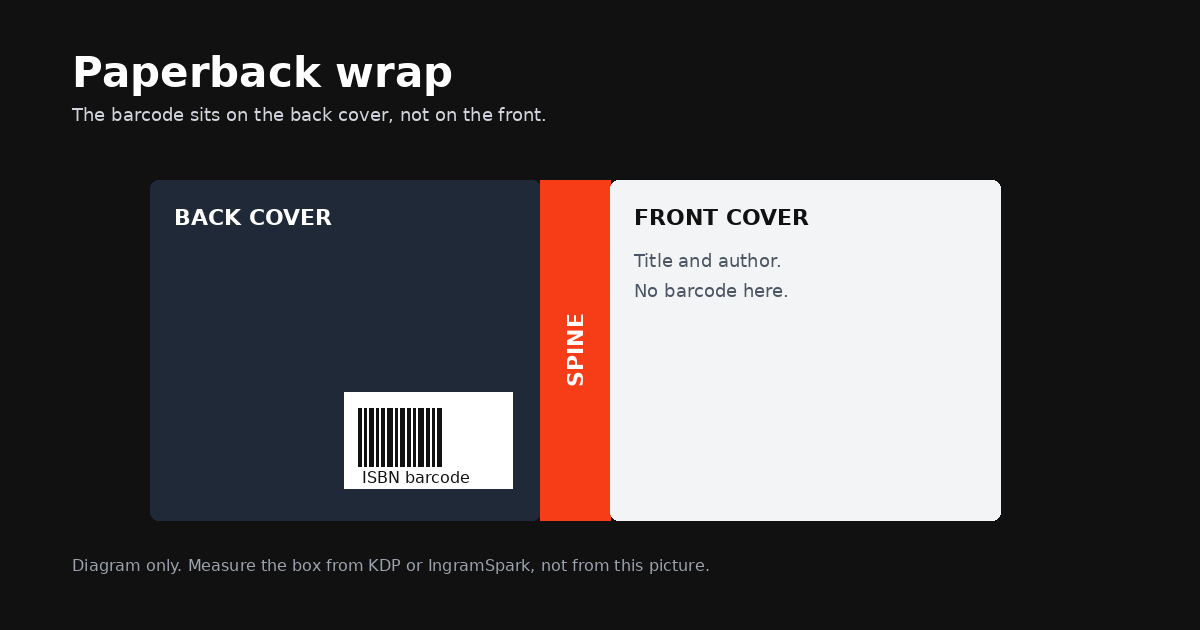
A printed book needs a barcode so a shop, a warehouse, or the printer can scan it. An ebook does not. The rules for where that barcode sits are short, and they are different for a KDP paperback, a KDP hardcover, and an IngramSpark cover. This page collects the figures those companies publish, and leaves out anything they do not.
If you already have an ISBN and you want the barcode file, the free ISBN barcode generator makes a PDF, EPS, or PNG. The size of the cover the barcode sits on comes from your trim, page count, and paper. The KDP cover calculator works that out for Amazon KDP paperback and hardcover only.
Where the barcode sits on a KDP paperback
A KDP paperback cover is one PDF: back cover, spine, and front cover together. The barcode belongs on the back cover, not on the front and not on the spine. KDP's paperback template labels a barcode margin on that back cover, which is there so the code does not shift during printing and still scans.
KDP's paperback help page does not name one corner for every left-to-right book. It does name a corner in two specific cases:
- For a right-to-left book, the cover calculator puts the back cover to the right of the spine, and KDP says the barcode is placed at the lower left-hand corner of the back cover.
- For a low-content paperback, when KDP adds the barcode, they place it in a white box in the lower right-hand corner of the back cover.
For an ordinary left-to-right novel, use the barcode margin on the template you download for that exact book. Do not guess a corner and then set the blurb on top of it. The clearance rule, which applies to a barcode you place yourself, is the part you can measure without the template: at least 0.25 inch (6.3 mm) from the spine, and at least 0.25 inch (6.3 mm) from the trim.
Those figures are from KDP's Create a Paperback Cover page and the Barcodes page. The low-content corner is from Low-Content Books.
Size, colour, and the clear area
If you upload your own barcode on a paperback, KDP publishes this list. A file that misses it can be rejected, or the barcode can fail the scan check during upload.
| Requirement | What KDP publishes for a paperback barcode you supply |
|---|---|
| Suggested size | 2 inches by 1.2 inches (50.8 mm by 30.5 mm) |
| Smallest size | 1.4 inches by 0.8 inches (35.56 mm by 20.3 mm) |
| Clearance | At least 0.25 inch (6.3 mm) from the spine and from the trim |
| Background | Solid white |
| Ink | 100% black. Not an RGB or CMYK colour, and not registration black |
| File | Vector preferred. A raster image should be 300 PPI, sharp, and not blurry |
| Orientation | Right-side up, and square to the cover |
| How it sits in the file | Not flattened into the cover so the barcode and the artwork become one image |
A few more rules from the same page, because they cause quiet failures:
- If the barcode contains an ISBN, that ISBN has to be valid and it has to match the book's ISBN exactly.
- The barcode must not overlap any text.
- If you include a price code, it should match the list price.
- You may add a QR code or a UPC as well, but it cannot sit in the space reserved for the ISBN barcode.
- Two-stage barcodes, the kind often used on Japanese books, are not supported.
Keeping the barcode as its own image matters. If you merge it into the background, KDP's check may not be able to read it. A vector PDF or EPS stays sharp when the printer scales it. A PNG has to already be sharp at 300 PPI.
KDP has been retiring Transparency codes from print barcodes. The note on their Barcodes page says the feature is not available for books created after November 2025, and that the code does not change the barcode box dimensions. Older books may still print with one. It is not a second barcode you have to design.
What happens if you leave the area blank
You can upload a paperback cover with no barcode at all. KDP will add one on the back cover. Their wording is direct: if you use Cover Creator or Cover Studio, or you choose not to provide your own barcode, they place one for you.
Blank does not mean "put the blurb there and hope." The same page says that a cover with images or text in the barcode location will be rejected. The safe version of "leave it blank" is a clean area, with nothing important in it, so their barcode has somewhere to land.
On a low-content book the warning is more specific. If you publish without an ISBN, or you do not supply a barcode, KDP places one in a 2 inch (50.8 mm) by 1.2 inch (30.5 mm) white box in the lower right-hand corner of the back cover. They say that if you leave images or text on that part of the cover, the barcode will cover them during printing, and the file could be rejected. So do not put a logo, a photo, or the last lines of the blurb in that corner.
If you did supply a barcode and the upload says it failed validation, KDP gives you two ways out. Fix the barcode so it meets the list above, or remove it and upload again. They will add a barcode at no additional cost, and they say an Amazon-placed barcode is guaranteed to meet their manufacturing requirements.
One limit is worth knowing before you rely on their barcode. A free KDP ISBN can only be used on KDP. If you also print the book somewhere else, you need an ISBN you own, and a barcode that encodes that ISBN. That is the case the barcode generator is for.
How a KDP hardcover differs
Hardcover is not "the paperback rules, but thicker." KDP publishes a separate barcode specification on Create a Hardcover Cover.
If you include your own barcode:
- It has to be 300 DPI.
- It needs to be 2 inches (50.8 mm) wide and 1.2 inches (30.5 mm) high. Unlike paperback, the hardcover page states this size rather than a suggested size plus a minimum.
- Place it at least 0.76 inch (19 mm) from the bottom of the cover, and at least 0.25 inch (6 mm) from the spine hinge.
- It must not obscure other elements.
- If it does not meet the specification, KDP says they will replace it.
If you do not include one, they place an ISBN barcode in a 2 inch by 1.2 inch white box in the lower right-hand corner of the back cover. Anything you left there gets covered when the book is printed. Leave that corner empty of text and of anything you need a reader to see.
There is also a hinge. KDP describes a 0.4 inch (10 mm) space between the spine and the safe area on the front and back covers. Do not put text or the barcode in that hinge, because the cover bends there and the barcode can distort.
The rest of the hardcover file is still one PDF of back, spine, and front, with wrap around the case. The full width depends on trim, page count, and paper, which is what the KDP cover calculator is for. It returns KDP dimensions only.
How IngramSpark differs
IngramSpark treats the barcode as mandatory on every print cover. Their File Creation Guide (the PDF headed 8.24.26) says the barcode on a Lightning Source cover template is the only item you may move, and that you must not resize it. On the template, that barcode starts centered on the back cover. You can reposition it anywhere inside the pink safe area of the back cover. That safe area sits 0.125 inch (3 mm) inside the trim and inside the spine fold. Text, logos, and the barcode all stay inside it. They also recommend keeping text a further 0.125 inch inside that box, for 0.25 inch of safety, but the barcode rule they state is the pink area itself.
A barcode you create has to be 100% black only, on a white box or white background.
If you cannot supply a barcode, leave a clear area of at least 1.75 inches wide by 1 inch high so they can place one. They will add or replace a barcode that is unscannable or incorrect. If the book has no ISBN, they add a generic barcode. The guide says the publisher may not be notified when they do this. Do not assume a missing barcode means a missing barcode on the printed book. It means they chose one for you, on top of whatever art was there.
Their User Guide, version 3.3, August 24, 2026, gives the box sizes in more detail:
- For a title with an ISBN, the standard EAN barcode is described as BwrP72 at 57.6 pt, and the white box should be 1.75 inches by 1.00 inch.
- No price on that barcode produces a 90000 extension.
- A title with no ISBN gets a generic barcode, and the white box for that one is 1.25 inches by 1.00 inch.
That is a different box from KDP's 2 by 1.2 inch suggestion, and a different clearance story. A cover built to the KDP barcode box is not automatically an IngramSpark cover. Download their template for the trim and page count you are actually printing. The IngramSpark cover template guide gathers the rest of their cover specifications. The KDP calculator on this site does not produce those dimensions.
Why an ebook cover never needs a barcode
An ebook cover is a picture of the front. There is no back cover, no spine, and nothing for a shop scanner to read.
KDP says this outright. The checklist on Cover Image Guidelines for Kindle eBooks tells you to make sure the cover does not include the spine, a barcode, the back cover, or an inside flap. Their Cover Studio page says an ebook cover is the front cover only. IngramSpark's File Creation Guide says the same thing in its own words: the ebook cover file is of the front cover only, as a JPEG, uploaded with an EPUB interior. Neither company asks you to put a scannable barcode on that image.
An ISBN is a different question from a barcode. On KDP, an ebook does not need an ISBN at all. A paperback or hardcover does, except for low-content books. That is from What is an ISBN and Imprint? and the Metadata Guidelines. If you do have an ISBN for the ebook, you enter it in the book's details. It is metadata. It is not a graphic on the front.
If you also want the number inside the book, it goes on the copyright page, not on the cover. KDP's manuscript templates say you can add an ISBN to the copyright page if you want, it is not required, and if you add it, it must match the number assigned to the book. Format it like 978-X-XXXX-XXXX-X. Their metadata rules say the same thing from the other direction: if your own ISBN appears in the manuscript, it has to match what you entered during title setup. A copyright page itself is optional. Their intellectual property FAQ says Amazon does not require one, and that if you want one you put it in the content file.
So the ebook front stays a front. Title and author name, nothing that looks like a shop barcode, and no price or temporary offer. KDP's cover guidelines also say the image must not mention pricing or other temporary promotional offers. A price add-on barcode would break that rule as well as the "no barcode" rule.
Which file you actually need
| Book | Barcode on the cover? | Where the ISBN goes |
|---|---|---|
| KDP paperback | Yes, on the back. You supply it, or KDP adds one. | Inside the barcode, matching the ISBN on the title. Optional on the copyright page, and it must match. |
| KDP hardcover | Yes, on the back, with the hardcover size and the hinge clearance. | Same idea: one ISBN for the hardcover, different from the paperback. |
| IngramSpark print | Yes, on the back. Mandatory. Move it if you need to, do not resize the template barcode. | Your own ISBN. A KDP free ISBN cannot be used outside KDP. |
| Ebook, KDP or IngramSpark | No. Front cover only. | In the product details. If it also appears in the book, on the copyright page. |
A check before you export
- Paperback and hardcover are two ISBNs, so they are two barcodes.
- The barcode is on the back cover, on white, in 100% black, and it is still its own image.
- For a KDP paperback you supply, it is at least 0.25 inch from the spine and from the trim, and not smaller than 1.4 by 0.8 inches. The suggested size is 2 by 1.2 inches.
- For a KDP hardcover you supply, it is 2 by 1.2 inches at 300 DPI, at least 0.76 inch from the bottom and 0.25 inch from the hinge.
- The corner KDP uses when they place the barcode is empty: lower right on a hardcover and on a low-content paperback, lower left on a right-to-left paperback.
- For IngramSpark, the barcode is inside the pink safe area, it has not been resized, and a missing barcode has a clear 1.75 by 1 inch area waiting.
- The ebook image has no barcode, no spine, and no back cover.
- Any ISBN printed on the copyright page matches the ISBN in the title setup.
The full cover still has to be the right width. Spine width changes when the page count or the paper changes, and a barcode placed against the old spine will sit in the wrong place on the new file. Recalculate with the KDP cover calculator after the interior is finished, then place the barcode. If KDP has already rejected a cover for a crowded back, the rejection guide walks through the other reasons as well.
Sources
Every measurement above is taken from these pages. Printers revise help pages, so if a figure here and the live page ever disagree, the live page wins.
- KDP: Barcodes
- KDP: Create a Paperback Cover
- KDP: Low-Content Books
- KDP: Create a Hardcover Cover
- KDP: Cover Image Guidelines for Kindle eBooks
- KDP: Cover Studio
- KDP: What is an ISBN and Imprint?
- KDP: Metadata Guidelines for Books
- KDP: Paperback and Hardcover Manuscript Templates
- KDP: Intellectual Property Rights FAQ
- IngramSpark File Creation Guide (PDF headed 8.24.26)
- IngramSpark User Guide, version 3.3, August 24, 2026 (PDF)
Frequently asked questions
Where does the barcode go on a KDP paperback?
On the back cover. A barcode you place yourself needs at least 0.25 inch (6.3 mm) of space from the spine and the same space from the trim. KDP's suggested size is 2 inches by 1.2 inches (50.8 mm by 30.5 mm), and the smallest they accept is 1.4 inches by 0.8 inches (35.56 mm by 20.3 mm). For a low-content paperback, the barcode KDP adds sits in a white box of the suggested size in the lower right-hand corner of the back cover. For a right-to-left book, KDP places the barcode in the lower left-hand corner of the back cover.
What happens if I leave the barcode area blank?
KDP adds a barcode on the back cover at no extra cost. If text or artwork is already in that spot, KDP says the cover will be rejected. On a low-content book, KDP also says the barcode will cover whatever you left there, and the file may be rejected.
Are hardcover barcode rules the same as paperback?
No. A hardcover barcode you supply has to be 2 inches wide by 1.2 inches high, at 300 DPI, at least 0.76 inch (19 mm) from the bottom of the cover and at least 0.25 inch (6 mm) from the spine hinge. If you leave it off, KDP places a 2 inch by 1.2 inch white box in the lower right-hand corner of the back cover, and that box covers anything underneath it. If your barcode does not meet the specification, KDP says they will replace it.
How does IngramSpark handle the barcode?
IngramSpark requires a barcode on every print cover. Their template starts with the barcode centered on the back cover. You may move it, but you must not resize it, and it has to stay inside the safe area, 0.125 inch (3 mm) inside the trim and the spine fold. If you cannot supply a barcode, leave a clear area at least 1.75 inches wide by 1 inch high. Their user guide describes that same 1.75 by 1 inch white box for a book that has an ISBN.
Does an ebook cover need a barcode?
No. KDP's ebook cover checklist says the image must not include a spine, a barcode, a back cover, or an inside flap. An ISBN is optional for a KDP ebook. If the book has one and you want it inside the file, the place for it is the copyright page, and it has to match the ISBN you entered when you set the book up. KDP does not require a copyright page.
Can the paperback and the hardcover share one barcode?
No. Each format needs its own ISBN. A barcode that contains an ISBN has to match that book's ISBN exactly, so the paperback barcode and the hardcover barcode are two different images.